
Ronald Koenig's Marine Navigator App
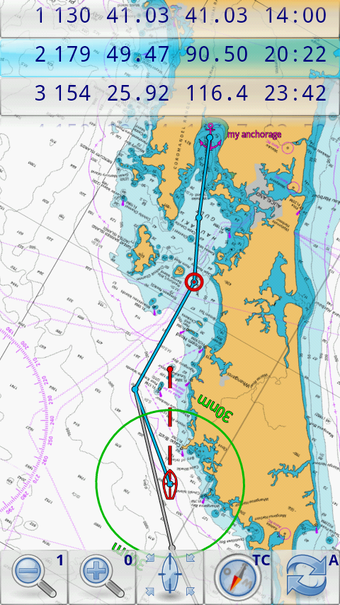
Marine Navigator is an offline navigator using raster navigational charts (RNC's) to plot your position in real time.
This way you can navigate with true copies of official paper charts on your mobile device. This full version of the Marine Navigator provides following enhanced functions:
- automatic chart switching depending on current position and zoom level
- scrolling through all charts available for the current location by "press and hold" zoom buttons
- display of number of available charts for current location in the zoom buttons
- display of outlines of installed charts in active chart
- chart rotation (True North, True Course, Compass Heading, original chart orientation)
- support of non-mercator projections (Polyconic, Transverse Mercator, UTM, ...) by polynomials
- support of geodetic datum other than WGS84/NAD83 by applying northing and easting
- tracks, way points, routes
- follow route automatically
- intuitive route editor
- gpx import and export of waypoints and routes
- gpx export of tracks
- recording of tracks in active and standby mode
- compass (magnetic heading, true heading, true north indicator)
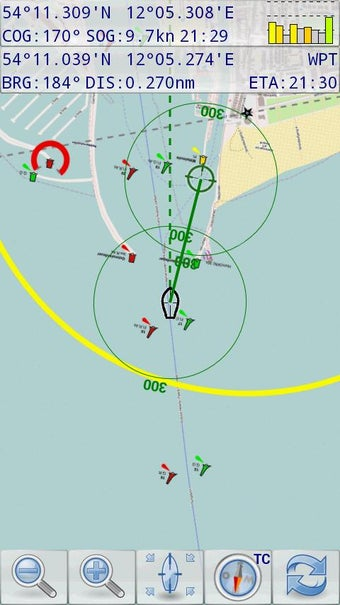
- different dashboard layouts (basic data, detailed route data, detailed GPS data including graphical status info)
- Man Over Board (MOB) functions
- import and storage of installed charts in external folders
- support of encrypted charts including activation via EMAIL
- switching between chart sets (support of large number of installed charts)
- AIS compatible with receiver connected by WiFi
Marine Navigator doesn't come with pre-installed nautical charts. Instead it is able to import BSB/KAP raster navigational charts or to use native Marine Navigator MNX-charts (see menu->help for instructions). BSB/KAP charts are available for free download on the Internet:
http://www.mar.mil.br/dhn/chm/box-cartas-raster/raster_disponiveis.html (Suite of CHM nautical charts that covers the coastal waters of Brazil and its major rivers)
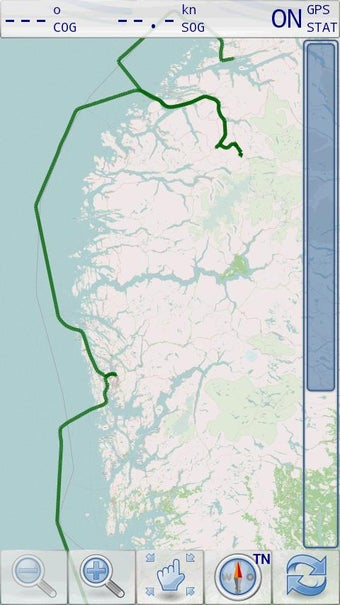
http://www.openseamap.org (Openseamap charts are based on Openstreetmap data enriched with additional nautical information. The charts cover selected european coastal waters).
Native Marine Navigator MNX-charts are offered by selected chart distributors. The charts are maintained by the distributor. They are not free. Further regions are coming):
http://maps.soltek.se (Charts for Sweden and Finland)
https://visitmyharbour.com (Charts for UK, Ireland, France, Belgium, Netherlands, Spain, Portugal and Atlantic)
Marine Navigator is has not been available in Google Play Store since 2023, however it can still be installed on all Android devices 7.1.1 or later. Here's how.
The distribution system works like this:
Buyer downloads and installs the app on the Android device first directly from this page. On start up, the app will require activation by entering the activation code. License allows ONE installation, PLUS one backup install. Buyer also purchases activation code from this page.
So for those who love using the app, it's still available on exactly the same basis as our charts. This buy and keep app comes with no charts. We make our profit on selling buy and keep licensed navigation chart packages.
Installation instructions:
- This will work on Android 7.1.1, released in October 2016 up to the latest releases. Regularly used and updated tablets/phones with Google account and up to date PlayStore on them should be fine. BUT.. if you've dragged something out of the drawer that hasn't been used for years... it's essential that you update Google Play first, by putting on a Google account (can be removed later..), and updating PlayStore OVERNIGHT-online. This will load all relevant updated SSL certificates.
- Important: Newer Android operating systems (11 onwards ?) make it difficult to even download and find the APK file. They rename the APK file .BIN, and hide it where you won't find it. You need to give Google Chrome browser specific permissions to download APK files. This article shows you how to set permissions for Chrome:
https://www.talkandroid.com/guides/beginner/guide-sideload-install-apk-app-android-12/
With permissions set for Chrome browser on new Androids, navigate back to this page using your Chrome browser to get the Marine Navigator app.
- DO NOT DOWNLOAD THIS APP on Android devices running operating systems older than 7.1.1 (7.1.1 was released in October 2016).
- Download Now and install the app directly to your Android device from this page. (do this before purchasing the unlocks). Alternative method at bottom of page
Marine Navigator APK file:
https://visitmyharbour-download.s3-eu-west-2.amazonaws.com/marineNavigator-SE-2.1.19.apk
You may get security warnings about downloading APK files to Android devices. Allow. With the Marine Navigator app in the downloads folder of your device, tap it to install.
You will get security warnings.. allow this installation.
- Start the app, and it will now ask for the Serial Code. Type it in and submit (must be online for this) if you already have it. If not you can close the app and return to it after purchase..below:
- Purchase Serial Codes using the Buy Now button.

Marine Navigator App
£9.95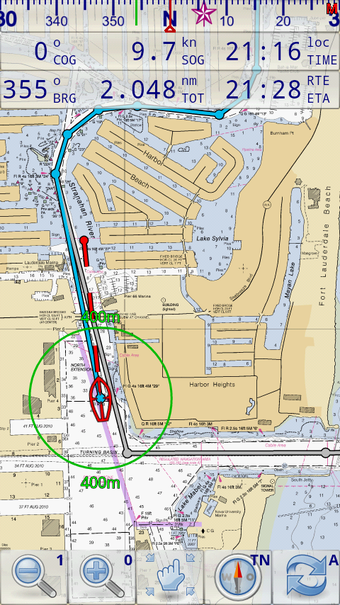
Read the latest guides for Marine Navigator
5 Good Reasons to Use Marine Navigator
09 Dec 2025
Marine Navigator app has been kept simple and uncluttered, designed for ease of use in real time afloat. Mr Koenig is an avid sailor and it shows in the useability of the app.
Ronald Koenig's Marine Navigator leaves Google Play
27 Oct 2021
Update: VMH arranges for the full AIS version of the app to be distributed directly
Tutorial 1 - App settings
09 Dec 2025
Short video shows how to tune up the settings in Maine Navigator app.
Tutorial 2- App control buttons
09 Dec 2025
Short video showing uses of the control buttons in Marine Navigator app:
Tutorial 4 - MOB, Markers and Waypoints
09 Dec 2025
Quickly set Man Overboard marker in emergency in Marine Navigator app. What to use Markers for, and how to build a library of Waypoints for later use.
About Marine Navigator app
25 Feb 2026
Details and history of this robust, easy to use, navigation app