By default, SeaClear displays GPS status visually in the top‑left status panel only.
- When a valid GPS signal is present, the panel is grey and displays “GP”.
In this state, your position is accurately plotted on the charts. - If the GPS signal is lost, or, in the case of VMH wireless GPS sets, if the Bluetooth connection is interrupted, the panel turns red and displays “DR”.
When operating in DR (Dead Reckoning) mode, SeaClear continues plotting a position based on the last known speed and direction, not your actual position.
While the GP (grey) and DR (red) modes are visually very clear on screen, many users prefer to have an audible warning when the GPS signal is lost. The following steps explain how to enable this feature when using Charts for SeaClear (2012 versions).
Enabling Audible GPS Loss Alerts
Step 1: Download the Alert Sound File
Download the supplied .WAV sound file.
- Your browser may attempt to play the file automatically in Windows Media Player.
- Ensure you Save As and store the file (commonly named
Ding.wav) rather than playing it.
Step 2: Copy the Sound File to the Correct Folder
- Open Drive C:.
- Locate the installation folder named:
VMH_SC_Inst_?.2012 - Open this folder and then open the folder inside it named:
1 - Copy the downloaded
Ding.wavfile into this1folder.
Step 3: Open SeaClear Settings
- Start SeaClear normally.
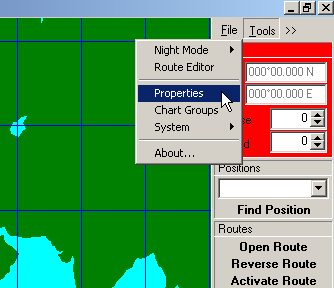
- From the menu bar, select:
Tools → Properties
Step 4: Enable Sound Alerts
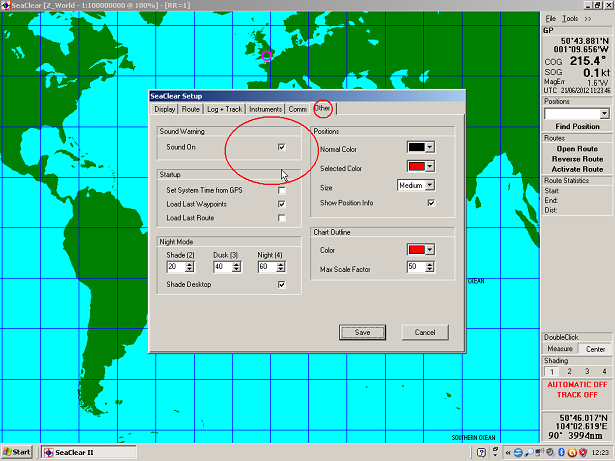
- In the Properties window, select the Other tab.
- Tick Sound On, as shown in the example screenshots.
Step 5: Save Settings
Click Save to apply the change.
How the Audible Alert Works
- When GPS is connected and the status panel is grey (GP), no sound is played.
- If the GPS signal is lost for any reason and SeaClear switches to red (DR) mode, an audible alarm will sound to alert you immediately.
The sound can be enabled or disabled at any time using the same Tools → Properties → Other setting.
Notes for Wireless GPS Users
If you are using a VMH wireless GPS:
- Loss of either the GPS signal or the Bluetooth connection will trigger the alarm (if enabled).
- If the Bluetooth connection is lost for more than a few seconds, it will not automatically reconnect when the laptop is brought closer to the GPS.
In this situation:
- If the GPS unit shows green and blue flashing lights, but SeaClear does not return to GP mode:
- Close SeaClear completely
- Restart SeaClear
- The GPS connection will then re‑establish correctly.
Safety Recommendation
We strongly recommend enabling the audible GPS loss alarm on all SeaClear installations.
It is a simple but effective safety feature, particularly when underway at sea, as it ensures you are immediately alerted if your GPS position is no longer valid.